
Field service profitability comes down to four systems: dispatch routing (cut drive time from 45% to 25% of the day), automated lead follow-up (recover the 60% of leads you're currently losing), standardized technician workflows (checklists, photos, on-site quoting), and performance analytics (know your revenue per technician, not just total revenue).
Every field service business owner knows the feeling: you started the company to do great work, but now you spend 80% of your day putting out operational fires. Missed appointments. Overlapping dispatches. Leads that sit untouched for days. Technicians who drive 90 minutes between two jobs that are 15 minutes apart.
This isn't a "work harder" problem. It's a systems problem. And it's solvable.
The Four Pillars of Field Service Operations
After working with hundreds of service businesses, we've identified four operational pillars that separate companies growing at 30%+ per year from those stuck on a plateau:
- Dispatch & Route Optimization - Getting the right technician to the right job at the right time, with minimal drive time.
- Automated Lead Follow-Up - Ensuring every inbound lead gets contacted within 5 minutes, automatically.
- Standardized Technician Workflows - Checklists, photo documentation, on-site quoting, and digital signatures.
- Performance Analytics - Real-time visibility into revenue per technician, first-time fix rate, and pipeline health.
Most businesses have bits and pieces of each. The breakthrough comes when all four work together in one system.

Pillar 1: Dispatch & Route Optimization
This is where most service businesses leave the most money on the table. The math is simple:
If your technician spends 45% of the day driving instead of working, you're paying a full salary for half a day's productivity.
| Metric | Manual Dispatch | Optimized Dispatch |
|---|---|---|
| Drive Time (% of day) | 35-45% | 20-28% |
| Jobs Per Technician/Day | 3-4 | 5-7 |
| Scheduling Errors | 12-18% | 2-4% |
| Customer Wait Time | 45-90 min | 15-30 min |
| Revenue Per Tech/Day | $900-1,200 | $1,500-2,100 |
The key principles of optimized dispatch:
- Skill-based assignment - Don't send a junior tech to a complex commercial job. Match technician skills to job requirements.
- Geographic clustering - Schedule jobs in geographic clusters, not chronological order. A 5-job cluster within a 3-mile radius beats 5 jobs scattered across a 30-mile area.
- Real-time reoptimization - When a job runs long or a cancellation comes in, the system should automatically shuffle the remaining schedule.
- Emergency priority handling - Some jobs (no heat in winter, flooding) need to jump the queue. The dispatch board should make this one click.
For a detailed comparison of dispatch platforms, see our dispatch software comparison and dispatch optimization deep-dive.
Pillar 2: Automated Lead Follow-Up
This is the silent revenue killer. A homeowner submits a quote request on your website at 2:47 PM. Your office is busy. Nobody calls until the next morning. By then, they've already booked with a competitor.
Research shows contacting a lead within 5 minutes makes you 21x more likely to qualify them. After 30 minutes, the odds drop nearly to zero. Most service businesses respond in 4-6 hours.
The solution isn't "try harder to answer the phone." It's automation:
- Missed-call-text-back - When a call goes unanswered, an automatic SMS fires within 30 seconds: "Hi, sorry we missed you! Are you calling about a new estimate or existing appointment?"
- Form-to-call automation - When a web form is submitted, the system automatically creates a task and triggers a call within 60 seconds.
- Follow-up sequences - If the first contact doesn't book, automated SMS/email follow-ups continue at day 1, day 3, and day 7.
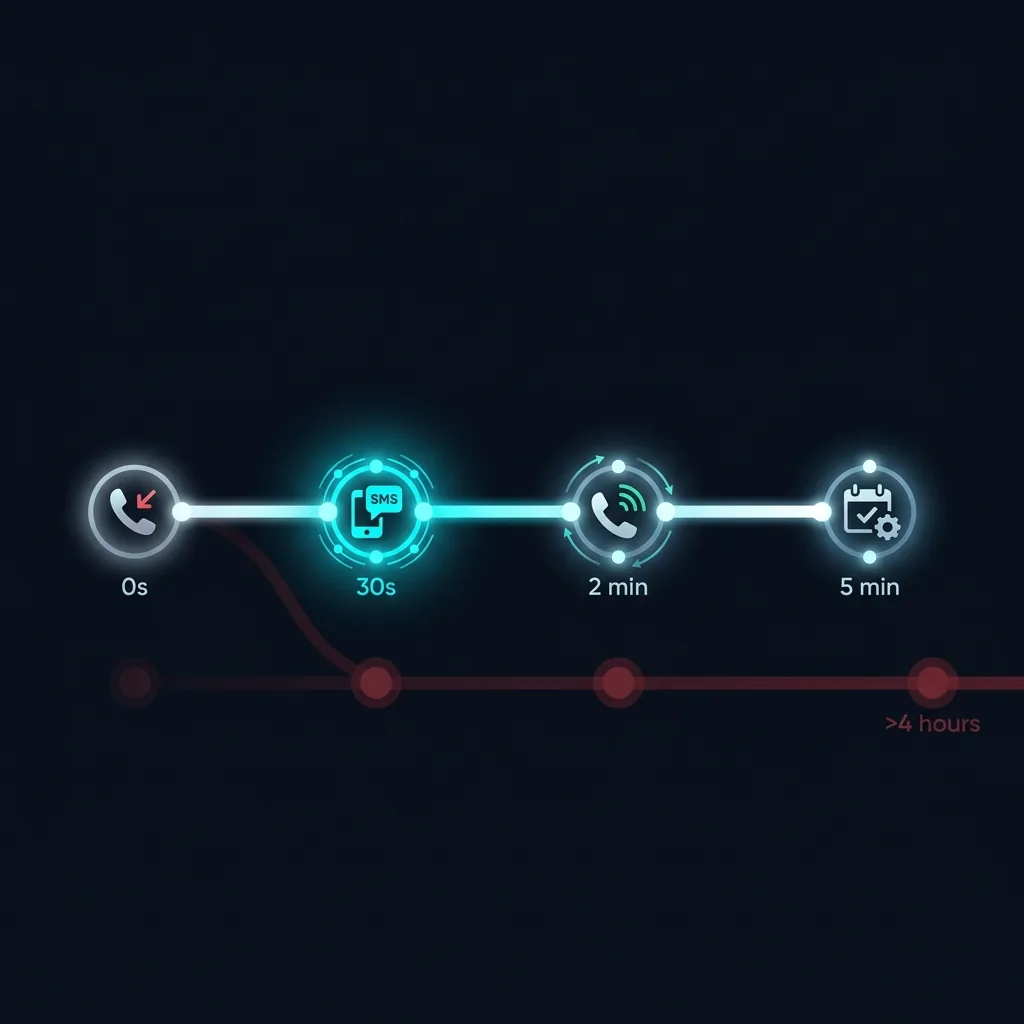
A CRM with a built-in dialer is essential for this. Learn why in our guide to CRM with built-in dialer.
Pillar 3: Standardized Technician Workflows
Your best technician does things differently than your worst. The gap between them isn't talent - it's process. Standardized mobile workflows close that gap:
- Pre-arrival checklist - Confirm equipment, parts, and customer expectations before arrival.
- On-site photo documentation - Before/after photos attached to the job record automatically.
- Good-Better-Best quoting - Present three repair options on a tablet with instant customer approval.
- Digital signature capture - Customer signs off on work completed, eliminating disputes.
- Automatic review request - The moment a job is marked "Complete," the system sends a review request SMS.

These aren't optional luxuries. They're the difference between a $300K/year operation and a $1.2M/year operation running the same number of trucks.
Pillar 4: Performance Analytics
You can't improve what you don't measure. These five KPIs tell you everything about your operational health:
Most businesses track total revenue and call it a day. But total revenue masks critical problems. You might be growing revenue while your profit per job is declining - because you're spending more on drive time, callbacks, and lost leads.
For an in-depth look at how AI can supercharge these metrics, read AI ROI for Service Businesses.
The Technology Stack That Makes It Work
All four pillars require technology. The question is: do you cobble together 5 separate tools, or use one platform?
| Capability | Fragmented Stack | All-in-One (Chillead) |
|---|---|---|
| CRM + Lead Tracking | HubSpot ($100/mo) | Usage-based |
| Phone + Dialer | RingCentral ($175/mo) | |
| Dispatch + Scheduling | Jobber ($250/mo) | |
| Invoicing | QuickBooks ($80/mo) | |
| Review Management | Birdeye ($200/mo) | |
| Monthly Total | $805/mo | Usage-based |
The real cost isn't just the subscription fees. It's the data silos. When your CRM doesn't talk to your dialer, your dispatch doesn't talk to your invoicing, and your field tech can't see customer history - you're flying blind.
5 Common Operational Mistakes
- Treating dispatch as "scheduling" - Scheduling is putting jobs on a calendar. Dispatch is real-time optimization. They're fundamentally different.
- Not tracking lead response time - If you don't measure it, you can't fix it. Most businesses are shocked when they learn their average response time.
- Paying per-user for every tool - A 10-person team on per-user pricing can spend $2,000+/month on software alone. Read about the per-user pricing trap.
- No technician accountability system - Without mobile checklists and photo documentation, quality varies wildly between technicians.
- Scaling by hiring instead of optimizing - Before you hire your 6th technician, make sure your existing 5 are each completing 5-7 jobs per day. Most aren't.
Your 30-Day Action Plan
Week 1: Measure your current state. Track lead response time, jobs per technician per day, and average drive time. You need a baseline.
Week 2: Consolidate your tools. Move to an all-in-one platform that handles CRM, dialer, dispatch, and invoicing. Start a free trial to evaluate.
Week 3: Implement automation. Set up missed-call-text-back, automated follow-up sequences, and review request triggers.
Week 4: Analyze and adjust. Compare your Week 4 KPIs to your Week 1 baseline. Most businesses see a 20-30% improvement in the first month.
For a deeper dive on scaling, see scaling a service business in 2026 and our field service automation guide.